Everything you need to understand a Salesforce org.
One map, built from source, drives every view. Explore the graph, grade the org, plan a
clean deploy, audit access, and find what is fragile or dead. In the Studio, the CLI, or
as a tool any agent can call.
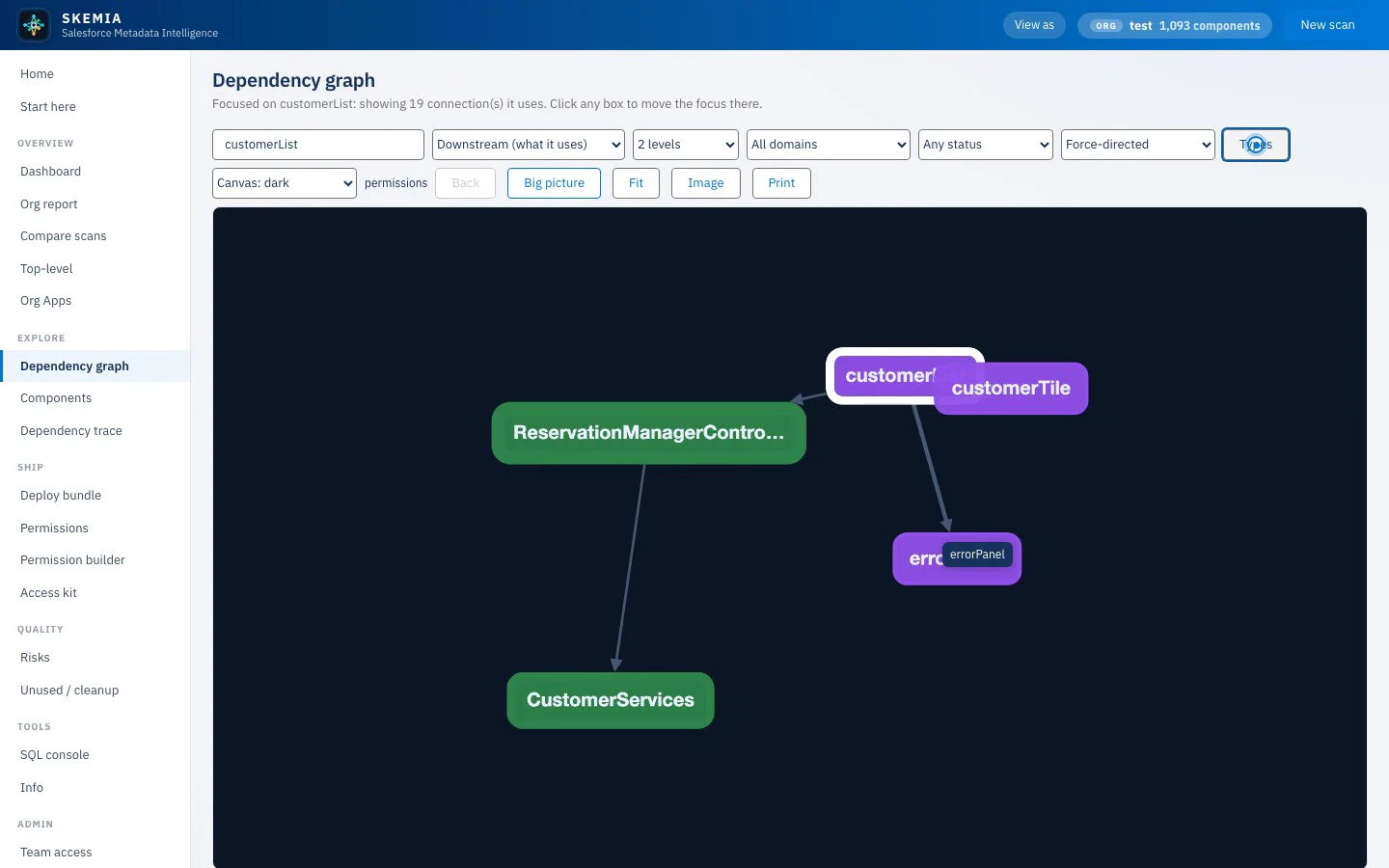
Dependency graph
The whole org, as one interactive map.
Focus any component to see its neighbourhood, coloured by type and sized by impact. Lay it out different ways, filter to the types you care about, and right-click a node to trace it, bundle it, or derive its access.
skemia · dependency graph
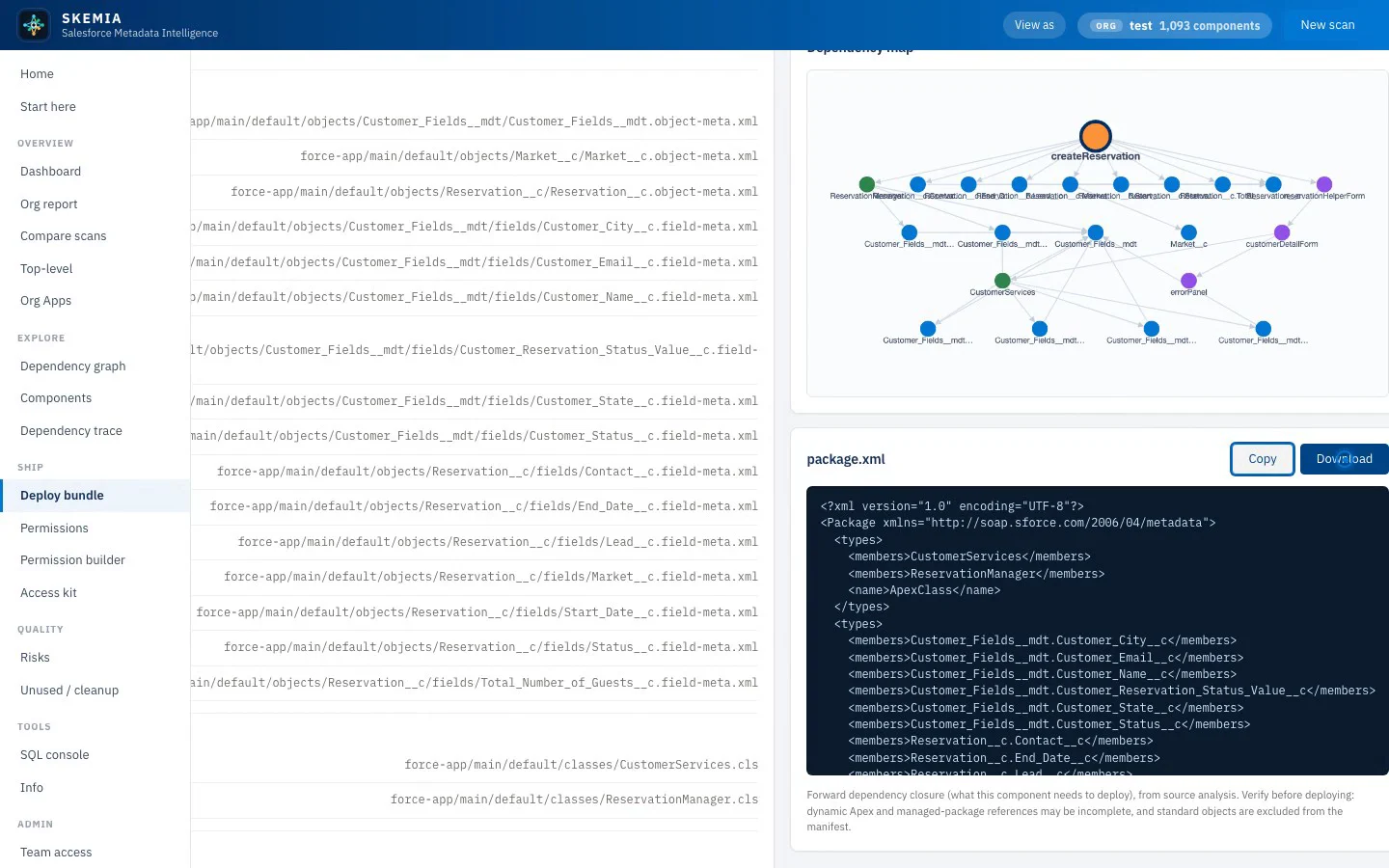
Deploy bundle
If you move this, what has to come with it.
Pick a component and Skemia computes its full dependency closure, groups it into a sensible deploy order, draws the bundle, and hands you a ready package.xml to copy or download.
skemia · deploy bundle
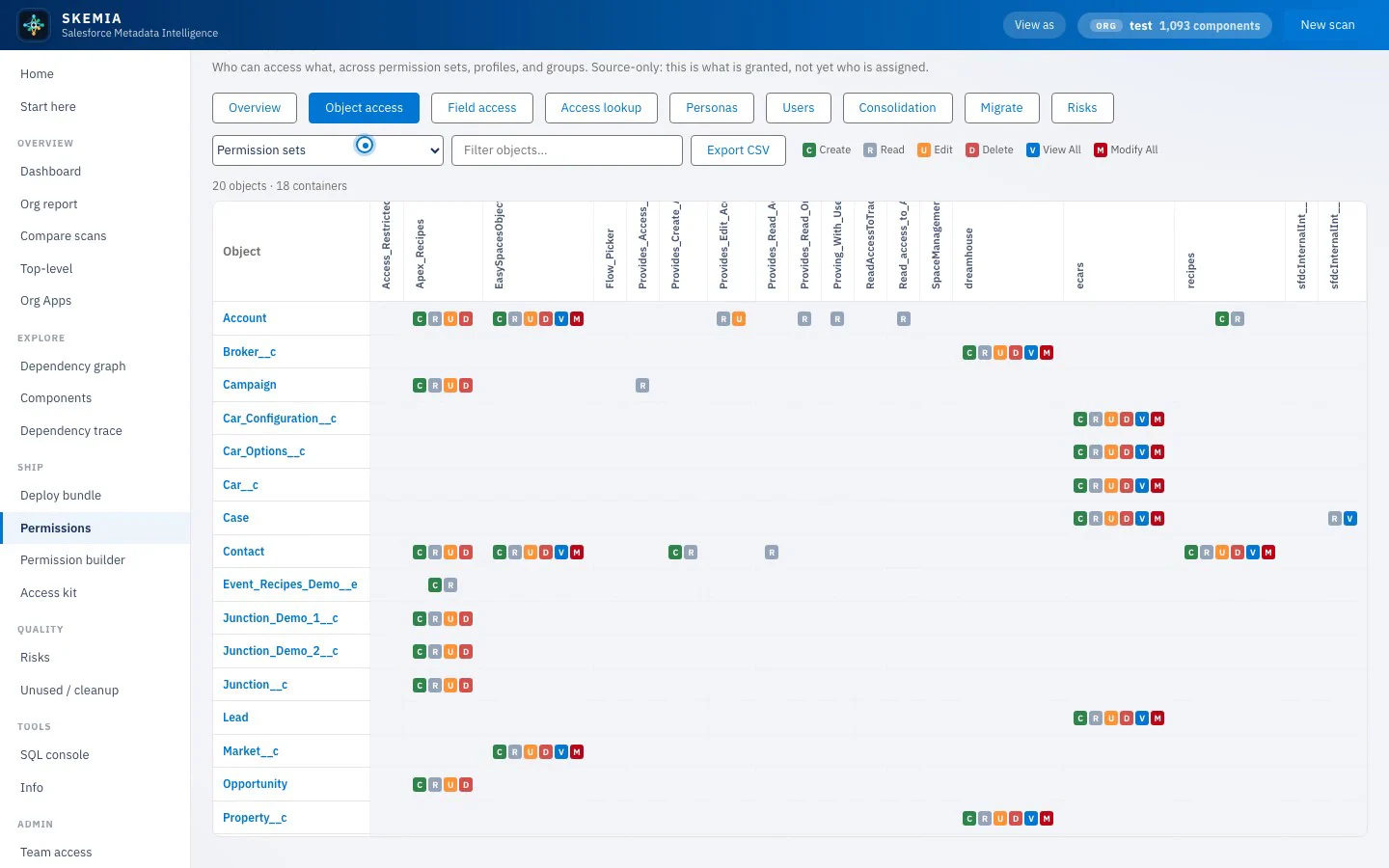
Permissions
Who can access what, read from metadata.
A clear matrix of object and field access across permission sets, profiles, and groups. Spot dangerous system permissions, overlap, and over-grants, and look up which personas reach any component.
skemia · permissions
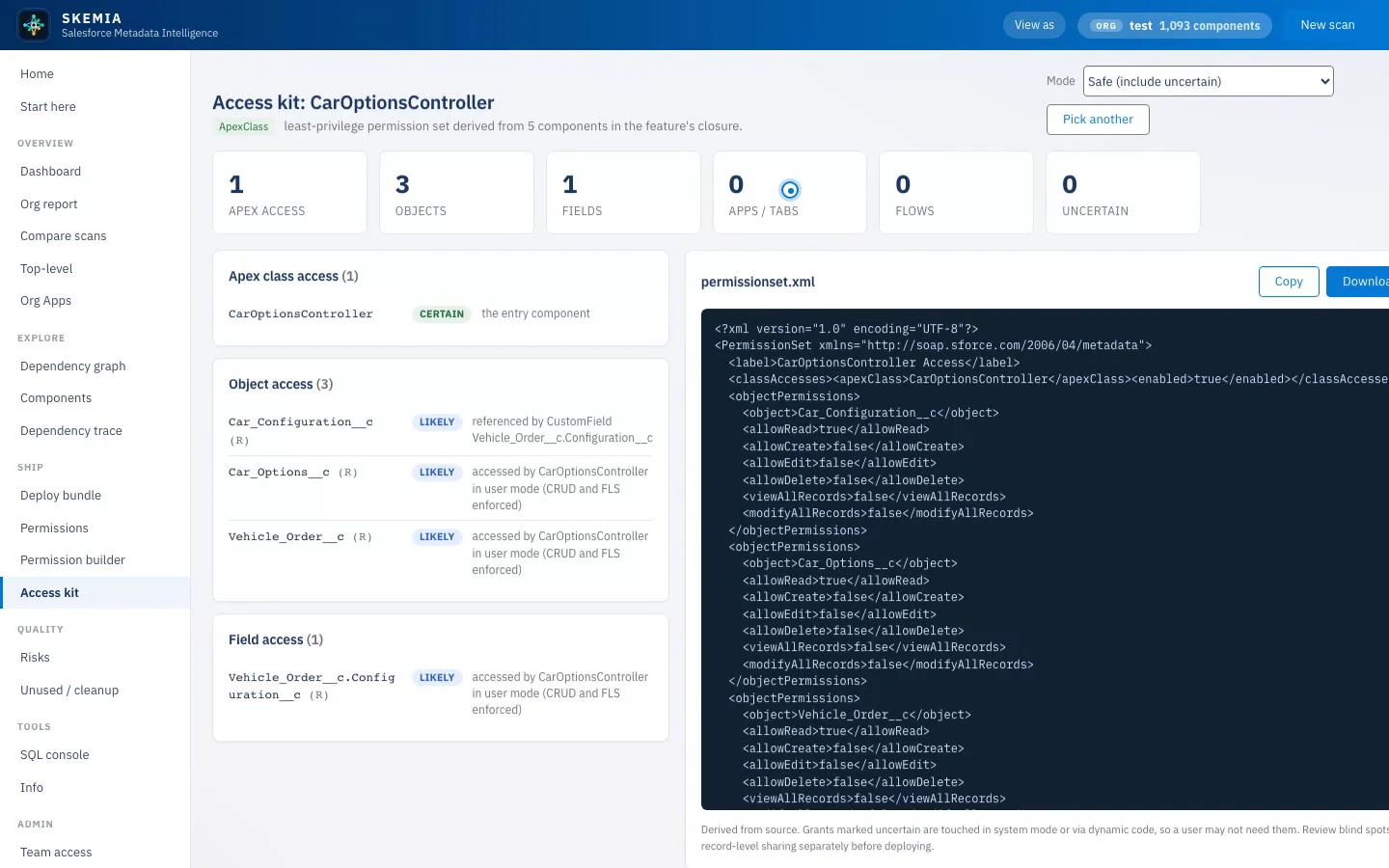
Access kit
The least-privilege set, derived from source.
Pick a feature, app, component, flow, or controller and Skemia derives the exact permission set a user needs to run it. Every grant is earned and explained, with a confidence and a reason, ready to deploy.
skemia · access kit
Everything else
The full toolkit.
Dependency graph
The whole org, as one interactive map.
Lay the org out different ways, filter the noise to the types you care about, and focus any component to see its neighbourhood. Right-click a node to jump straight to its details, trace, deploy bundle, or access kit.
Colour-coded by metadata type
Sized by impact
Filter by domain, type, or git author
Org health grade
One read on how healthy the org is.
A single grade summarises the org, with the factors that moved it: missing references, circular dependencies, and the fragile high-coupling hubs that make change risky. Headline counts across components, Apex, flows, and more.
0 to 100, explained
Risk profile + relationship mix
Most depended-on components
Deploy bundle
If I move this, what has to come with it.
Pick any component and Skemia computes its full dependency closure, groups it into a sensible deploy order, and hands you a ready package.xml. A focused diagram of the bundle, copy or download the manifest, and go.
Full forward closure
In deploy order
Ready-to-use package.xml
Impact trace
See the blast radius before you touch anything.
Walk a dependency chain level by level. Choose downstream to see what a component relies on, or upstream to see what relies on it, and Skemia expands the tree so the full reach of a change is visible up front.
Upstream + downstream
Level-by-level expansion
Export or print the trace
Permissions analysis
Who can access what, read straight from metadata.
Read across permission sets, profiles, and groups. Object and field access, dangerous system permissions, and least-privilege risks, laid out. Look up a component and see which personas reach it, and where grants overlap or over-reach.
Object + field matrix
Dangerous-permission flags
Overlap + over-grant detection
Access kit
The least-privilege permission set, derived from source.
Pick a feature, app, component, flow, or controller, and Skemia derives the exact permission set a user needs to run it. Every grant is earned and explained, with a confidence and a reason, and the deployable set is ready to copy.
Every grant explained
Confidence + reason per grant
Flags dynamic-code blind spots
Pro
Permission builder
Do not just read permissions. Build them.
Compose a permission set or group from objects, fields, Apex, and user permissions, and preview exactly what the result grants before anything is created. When it is right, generate the deployable metadata.
Live grant preview
Sets and groups
Generates deployable metadata
Risks + cleanup
Keep the org honest.
Risks collects everything fragile in one list: missing references, circular dependencies, and high-coupling hubs. Unused and cleanup finds orphaned metadata and superseded OmniStudio versions, and hands you a destructiveChanges manifest.
Fragility in one list
Orphaned + dead metadata
destructiveChanges manifest
Compare scans
Drift, made visible.
Diff one scan against another, id by id, to see exactly what changed between two environments, or against the same org over time. Change-by-type up top, then added, removed, and changed components, and the risks that appeared or resolved.
Environment vs environment
Added / removed / changed
Risks appeared or resolved
CLI, MCP, and SQL
Query the map however you work.
The same map drives a CLI, an MCP server so any agent can ask it questions as a tool, and a read-only SQL console over every component, dependency, and risk. Built once per project and cached, with a PR impact gate for CI.
MCP server for agents
Read-only SQL escape hatch
PR impact gate for CI
Coverage
It reads the metadata your org is actually made of.
Apex is parsed with a real grammar, not regex, for accurate type resolution and a
method-level call graph. LWC is parsed with Babel for exact imports. OmniStudio is read
from its real source format.
Code
Apex classes
Apex triggers
Flows
LWC
Aura bundles
Data model
Objects
Fields
Record types
Validation rules
Value sets
UI
FlexiPages
Layouts
Apps
Tabs
ExperienceBundle
Security
Permission sets
Permission set groups
Profiles
Muting sets
OmniStudio
OmniScript
Integration Procedure
DataRaptor
FlexCard
Decision Matrix
Integration
Named credentials
External credentials
Remote sites
Custom metadata
Static resources
and more: layouts, list views, compact layouts, labels, package.xml, destructiveChanges, sfdx-project.json
One map, every view
Map your first org in under a minute.
Download Skemia free and scan a local project or a metadata zip. No account, no org connection.