Skemia reads your Salesforce source and metadata on your own machine, then shows how every
component connects, what a change will reach, and who can access what. The scan needs no
credentials and no org connection, and Skemia never writes to your org.
Building the map reads files on disk. No login, no Salesforce CLI, no upload. When you do
want a live org, Skemia uses your own Salesforce CLI, and it only reads.
Look inside
Focus any component and see its whole neighbourhood.
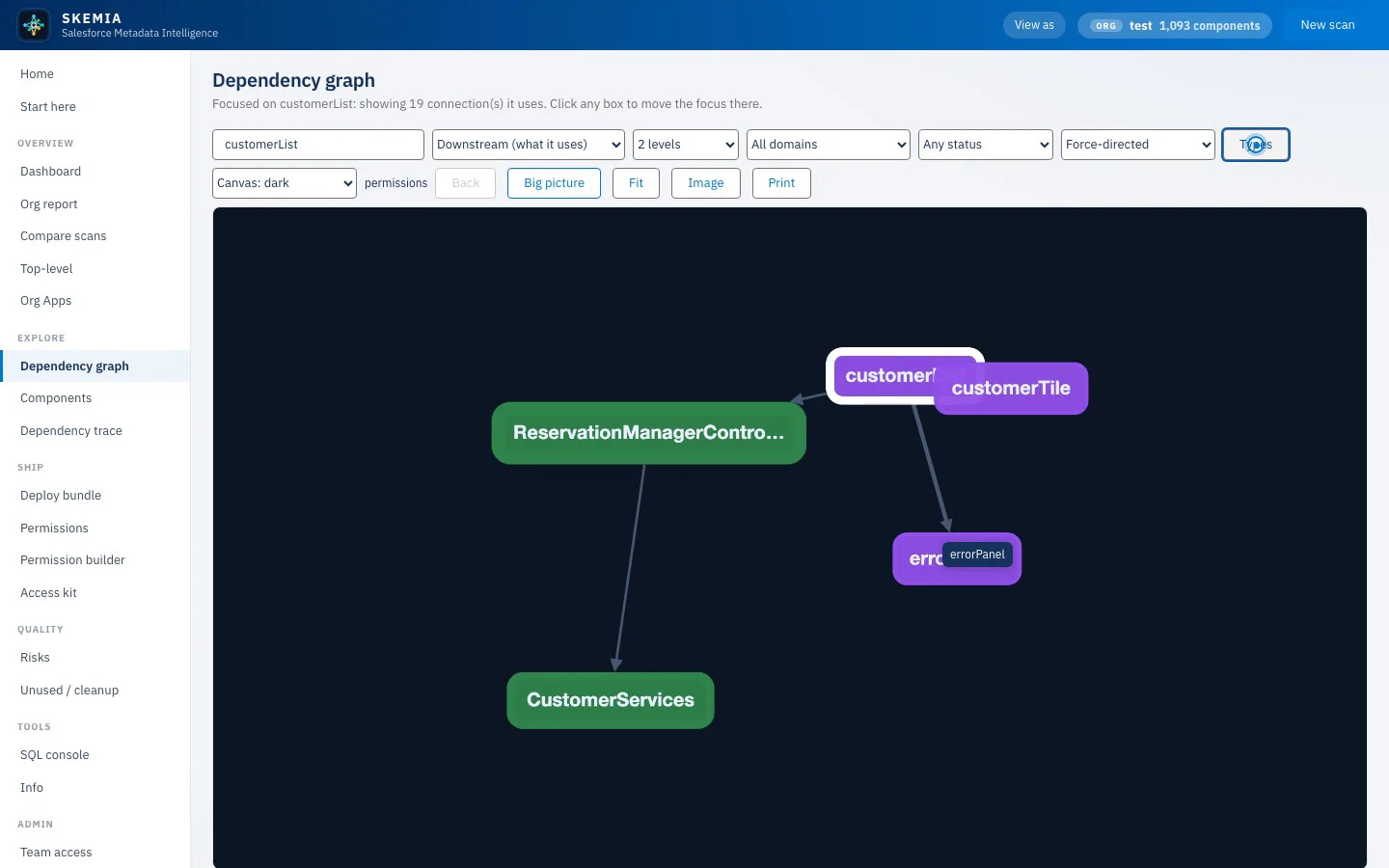
The interactive graph maps the whole org. Focus a component to see what it uses and what
uses it, coloured by category and sized by impact. Every edge says how sure it is.
skemia · dependency graph
Local by design
Your metadata stays on your machine.
Source-only analysis
Building the map reads files on disk. It needs no Salesforce credentials, no Salesforce CLI and no org connection, and it writes only to its own output folder.
No telemetry, no account
The Studio, the CLI and the engine run on your machine. The Studio listens on this computer only by default. Anything that contacts a network is a feature you start, and each one is listed on the security page.
Evidence you can check
Every dependency carries High, Medium or Low confidence and the file that justifies it. Low means a lead, not a fact. No model can add or remove an edge.
How it works
From a folder of metadata to a map you can read.
01
Point it at your source
A local DX project, a metadata zip, or a Git repository. With an org key, Skemia can also retrieve an org through your own Salesforce CLI. Narrow the scan to the metadata you care about.
02
Skemia maps it, on your machine
Apex is parsed with a real grammar and LWC with Babel. Every dependency carries a confidence and the file that proves it. The graph is deterministic: the same source gives the same map.
03
Read it, trace it, act on it
Explore the graph, trace the impact of a change, plan a deploy bundle, work out least-privilege access, and find what is fragile or dead. In the Studio, the CLI, or through an AI agent over MCP.
Focus any component to see what it uses and what uses it, coloured by category and sized by impact. Filter by Area, type or status, change the layout, and right-click a node to jump to its details, trace, deploy bundle or access kit.
Every edge rated High, Medium or Low
File path evidence on each edge
Export as an image or print
Impact trace and PR gate
See the reach of a change before you make it.
Walk a dependency chain level by level, downstream to see what a component relies on or upstream to see what relies on it. In CI, ske diff reports the blast radius of the files a pull request changed and can fail the build when they have dependents.
Upstream and downstream
ske diff --fail-on-impact for CI
Source-level impact, not a runtime guarantee
build key
Deploy bundle
If you move this, what has to come with it.
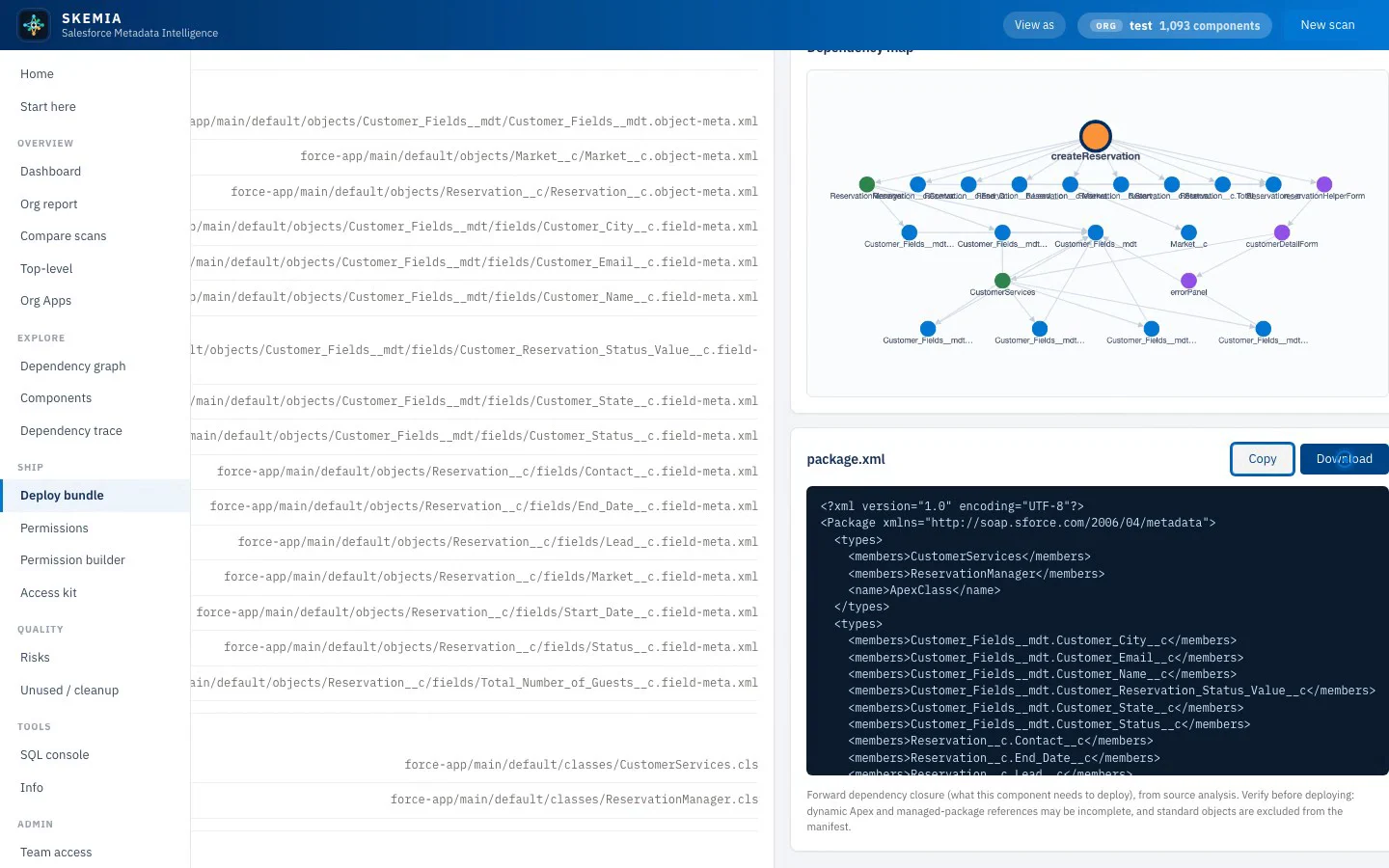
Pick a component and Skemia collects what it depends on, groups it in a suggested deploy order, and writes a package.xml. Items it leaves out are listed with a reason. You deploy it with your own tooling: Skemia never deploys.
Studio view needs a build key
Forward dependency closure
Suggested deploy order
package.xml to copy or download
Permissions analysis
Who can access what, read from metadata.
Object and field access across permission sets, profiles and groups, with muting applied. Dangerous system permissions are flagged, overlapping sets are scored for consolidation, and for an object the answer includes its sharing rules. It shows what is granted, not who is assigned.
Object and field matrix
Dangerous permission flags
Overlap and consolidation candidates
build key
Access kit
A least-privilege permission set, derived from source.
Pick a feature entry point, such as an app, component, flow or controller, and Skemia derives a candidate permission set from what it touches. Each grant carries a confidence and a reason, and blind spots from dynamic code are called out. Review it and validate it in a sandbox.
Studio view needs a build key
A reason for every grant
Minimal or safe mode
Access audit against an existing set
CLI, MCP and SQL
Query the map however you work.
The same map drives the ske command line, an MCP server with 31 tools so an AI agent can ask the map instead of reading files, and a read-only SQL console over every component, dependency and risk. No MCP tool connects to an org.
31 MCP tools
Read-only SQL
Scriptable and CI-ready
See it live
A 30-minute walkthrough on a call.
From the health score to the deploy bundle, permissions and the access kit. Book a time and we will walk an org end to end and answer your questions.